Existing customer billing questions
I'd like to pay my invoice over the phone.
I thought I had a credit card on file.
I thought I was on autopay.
I sent in a check and I am still getting late notices.
I gave a check to the tech and I am still getting late notices.
Do I have a balance?
How much is my balance?
Budget billing - change GD to show balance for entire year that is due in 12 months and have payments processed in stripe applied to balance each month. simplify payments to be on same day each month and apply that balance monthly to stripe the next day (see xero options?)
Client paid by check:
1. Does the name on the check the client paid with match the name on the account in Gorilladesk?
If not, get the name on the check and, if possible, the check number. Record this information in the notes on the client's account in Gorilladesk, click "notify", select Jane Cabrera. Let the client know that Jane is going to find the check in our deposits and apply the credit properly. She will also add the alternative name to the account so it won't happen again. Once this is done, Jane will email the client to let them know.
If yes, go to number 2
2. Was the check mailed to PO Box 11261, College Station 77842?
If not, was it mailed to 4272 Bird Pond Road, College Station, TX 77845? If mailed to Bird Pond, record this information in the notes on the client's account in Gorilladesk, click "notify", select Scott Lingren. Let the client know that Scott will check the incoming mail there for the check and deposit it ASAP. Once this is done, Scott will email the client to let them know. Also, please ask the client to change the billing address to our PO Box mentioned above.
Client thought they had a credit card on file or were on autopay:
We changed software in August of 2014 and security protocols restrict us from moving the credit cards over.
Once the credit card is in the new software - entered by them through the link in the invoice, by their tech, or over the phone - their technician will process the credit card after they do the service.
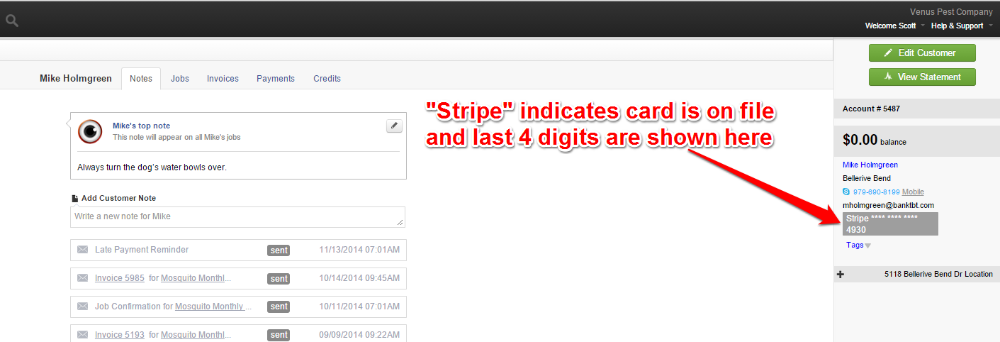
- Check to see if the credit card is in Gorilladesk and if the last 4 digits are correct.
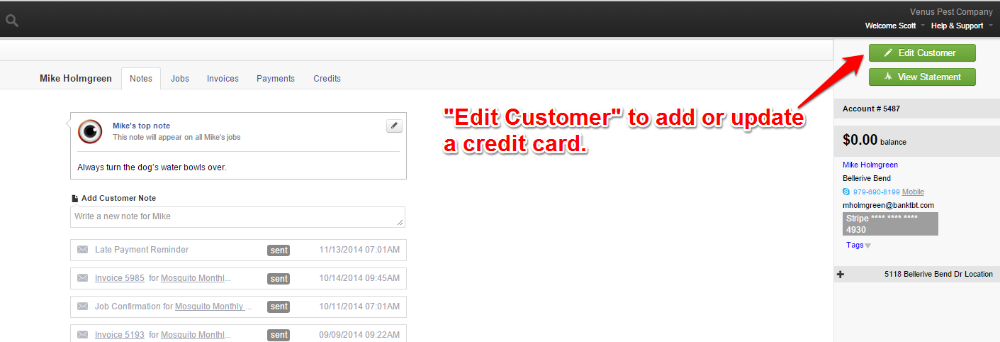
- No card, wrong card - "Edit Customer" to add or update card.
- You will have option to save the card for future transactions. Ask the client if they would like to do this.
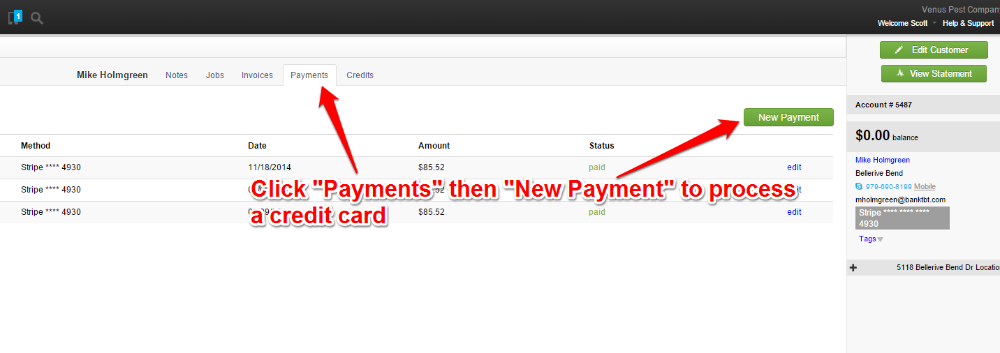
- Next, process payment by clicking "payments" tab and then the "add payment" button.
- Card appears correct - try to process payment by clicking "payments" tab and then the "add payment" button.
- If it fails, try updating the card - could be the expiration date - click "Edit Customer" to add or update card.
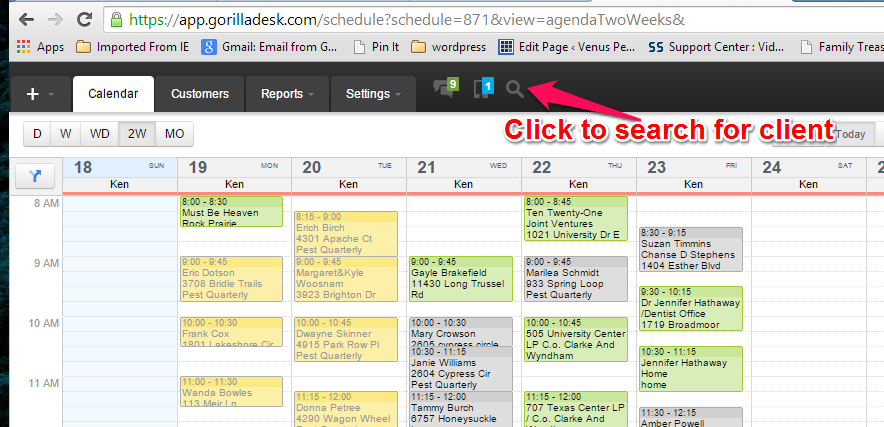
Search for client account
See if there is a credit card on file:
Add or update a credit card, if no card or last 4 digits doesn't match:
Process a credit card that appears correct or after updating: